
What does it mean to manage users in bulk via CSV or Excel?
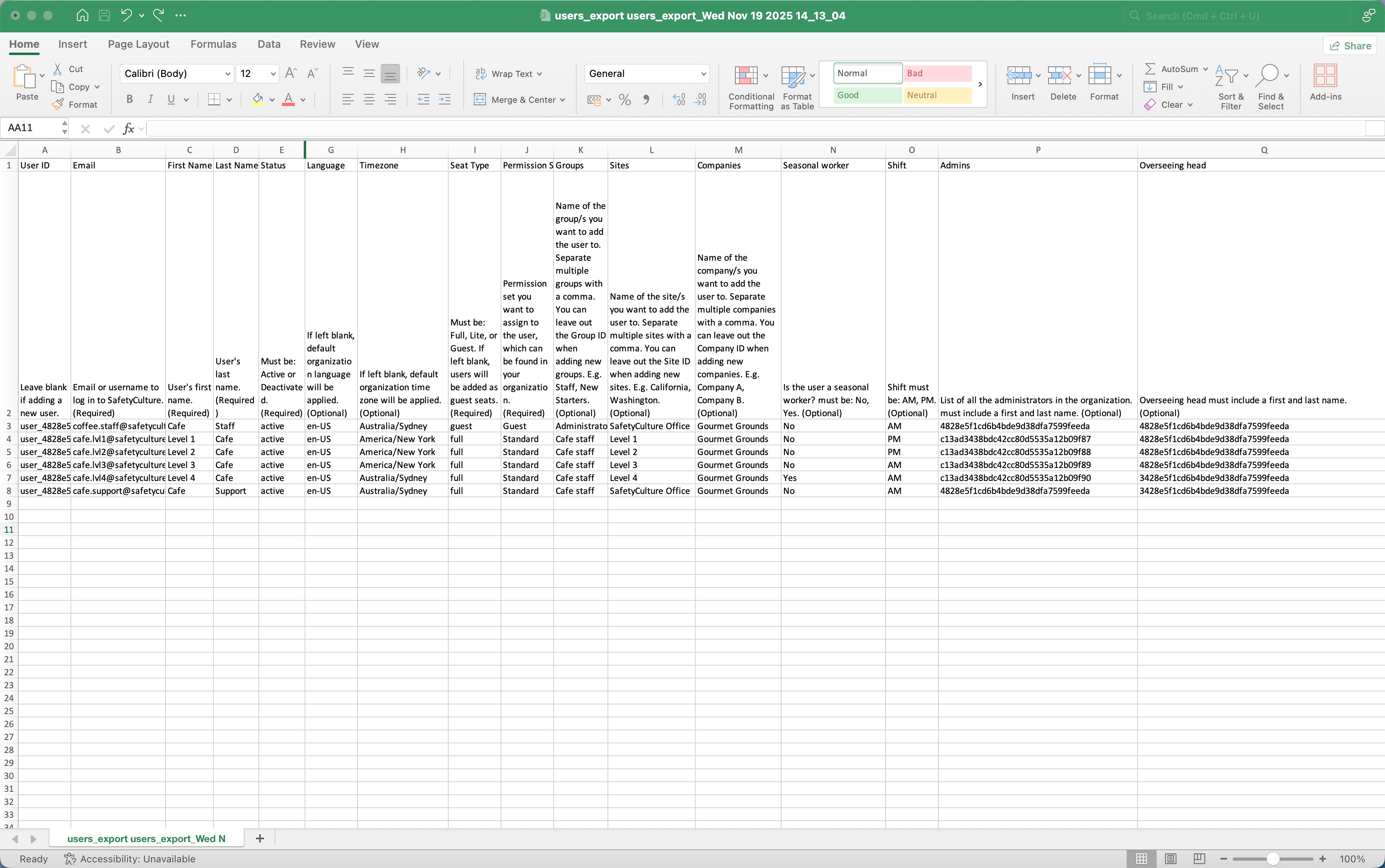
Managing users in bulk via a CSV or Excel file allows you to add new users and update existing ones at the same time. You can use a single file to keep details like seat types, permission sets, sites, groups, and user fields current across your entire user list.
CSV or Excel is the right fit when you're doing a one-off bulk add or update, or when your organization doesn't use a supported HR system. If your HR system is supported and you want user data to sync automatically each day, an HR integration is a better fit.
If your organization doesn't have available seats when a user is added, SafetyCulture will either purchase a seat automatically or block the user from being added.
Automatic seat expansion is currently in Early Access. If a seat is purchased, your billing administrator will receive an email, and your next invoice will include a prorated charge.
You can only bulk add or update up to 10,000 users per file at a time.
Bulk manage users via CSV or Excel
CSV and Excel column headers
Email, first name, last name, and status are required for every row in your file. For all other columns, refer to each description for what happens when a value is left blank.
Column header | Description |
|---|---|
User ID | The unique ID of each user in your organization. |
The account email address of a user. Updating existing users' email addresses is currently unsupported. | |
First name | The first name of a user. |
Last name | The last name of a user. |
Status | The account status of a user. Use "active" for new users or "deactivated" for existing users. New users can only be set as active. |
Password | The password of a user, which must be at least 8 characters, containing an uppercase letter, a number, and a special character. You can only set passwords for new users. If username login is enabled for your organization, you must set passwords for new users with no email addresses. |
Language | The account language of a user. Refer to the "ISO-639 language codes" section in this article for language codes that are supported on the web app. |
Time zone | The account timezone of a user in IANA timezone or Country/Region format. For example, "America/New_York". |
Seat type | Available on Premium Plan and Enterprise Plan only. The seat type (opens in new tab) of a user. If left blank, the user will be assigned a guest seat by default. |
Permission set | The name of the permission set (opens in new tab) of a user. Users' permission sets can only be updated if you have "Platform management: Permissions" permission. If you leave the seat type column blank when you add new users, they’ll be given a guest seat and the "Guest" permission set. |
Groups | The names of the groups (opens in new tab) of a user. If you leave the group column blank when you update existing users, their group memberships will be removed. |
Sites | The names of the sites or levels of a user. If you leave the site column blank when you update existing users, their site memberships will be removed. |
Companies | The names of the companies a user is associated with. |
Custom user fields | The custom user fields of a user. |
ISO-639 language codes
The table lists all languages supported via the web app.
Code | Language |
|---|---|
de | Deutsch |
en-US | English (United States) |
en-UK | English (United Kingdom) |
es | Español (España & México) |
fr | Français |
it | Italiano |
nl | Nederlands |
pt-BR | Português (Brasil) |


