What is the performance dashboard?
The performance dashboard offers an in-depth view of your organization's progression and engagement for the Training feature. From an overview of course completion rate and performance to a drill-down of performance (score and completion) at the course, group, and user levels, you can gather insights on what training strategy is working and refine your content over time to improve your team's learning continuously.
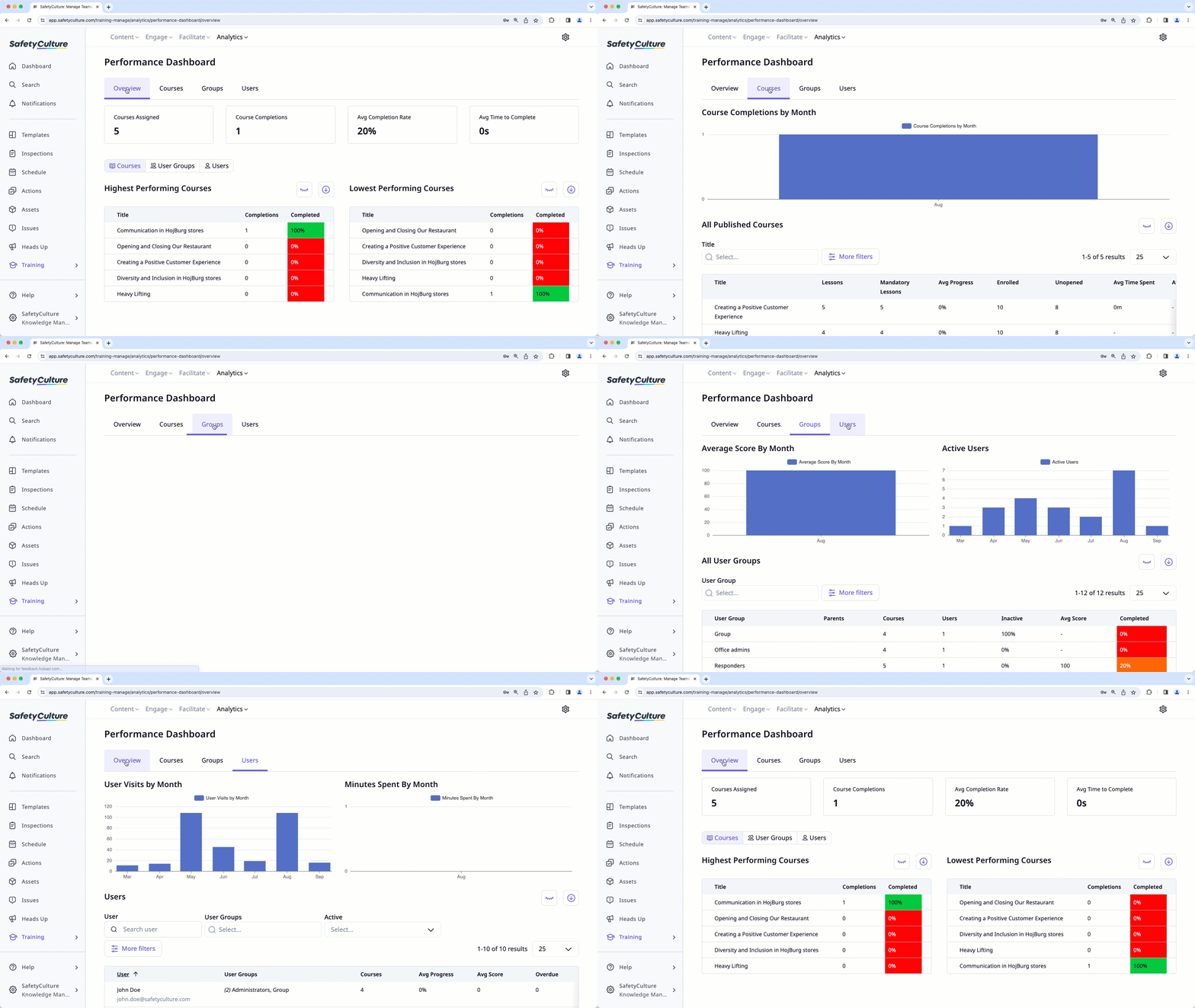
Performance dashboard gives you an in-depth view of training performance in your organization. If you want a simple view of your team member's individual course progress, consider using the training matrix or course completion by users.
What you'll need
By default, you can only facilitate training and view data from users in groups and sites for which you're a team manager. If you have "Training: Administration" permission, you can facilitate training and view data from all users in your organization.
View the performance dashboard
Select Training in the sidebar or select it in More.
Click Analytics at the top of the page and select Performance Dashboard.
On this page, you can click each course, group, or user to drill down to review each user's performance and engagement at a glance.
Training course data may take some time to sync and appear in the performance dashboard, course completion by users, and the training matrix.
We are actively working to enhance the syncing process and make data refresh faster.