Warum sollten die Einreichungen von Qualifikationsnachweisen in Analytics erfasst werden?
Verfolgen Sie die Einreichung von Qualifikationsnachweisen in Analytics, um einen Echtzeit-Überblick über den Status der Qualifikationsnachweise Ihres Teams für jeden Qualifikationstyp zu erhalten. So sehen Sie auf einen Blick, wer über gültige Qualifikationsnachweise verfügt und bei wem Nachfassmaßnahmen erforderlich sind. Lücken bei den Qualifikationen können leicht übersehen werden, wenn Sie mehrere Qualifikationen in einem großen Team nachverfolgen. Sie können Ihre Liste auch filtern, um Nutzer in bestimmten Auftragnehmerfirmen anzuzeigen, und jede Qualifikation für vollständige Details genauer untersuchen. Exportieren Sie Ihre Daten als CSV-Datei, um sie mit Managern zu teilen oder Nutzer mit abgelaufenen oder bald ablaufenden Qualifikationen nachzuverfolgen.
Was Sie brauchen
Einreichungen von Zugangsdaten nachverfolgen
Nur der Matrix-Diagrammtyp wird unterstützt.
Wählen Sie Analysen in der Seitenleiste oder unter Mehr aus.
Fügen Sie hinzu oder bearbeiten Sie ein bestehendes Diagramm.
Klicken Sie oben rechts auf der Seite auf Diagramm hinzufügen und wählen Sie Benutzerdefiniertes Diagramm hinzufügen aus.
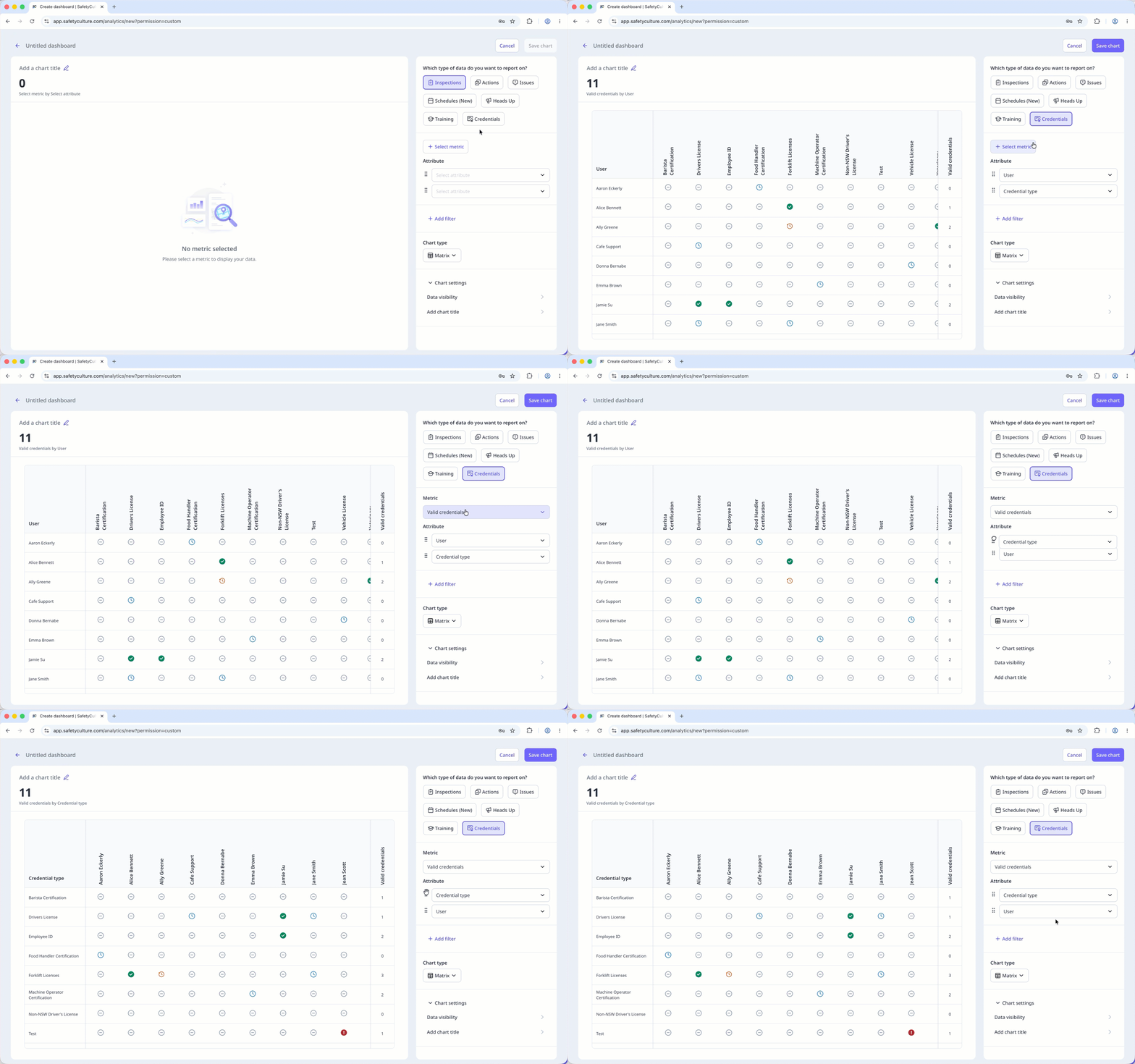
Konfigurieren Sie im Diagramm-Generator den Datentyp und die Metrik wie folgt:
Datentyp: Wählen Sie oben rechts auf der Seite Referenzen aus.
Metrik: Klicken Sie auf Messeinheit auswählen und wählen Sie im Dropdown-Menü Valid credentials aus.
Attribut: Ziehen Sie die Attribute, um sie neu anzuordnen. Das erste Attribut wird zu den Zeilen in der Matrix, und die Anzahl oben im Diagramm wird entsprechend aktualisiert.
Konfigurieren Sie Ihren Diagrammtyp entsprechend.
Klicken Sie oben rechts auf der Seite auf Diagramm speichern, um die Änderungen im Diagramm zu speichern.
Klicken Sie oben rechts auf der Seite auf Speichern, um die Änderungen in Ihrem Dashboard zu speichern.
Credential matrix statuses
: The credential has been submitted and is valid.
: The credential hasn't been submitted yet.
: The credential has been submitted and will expire in 90 days.
: The credential has been submitted and is past its expiration date.
: The credential has been submitted and is pending approval.
Limitations
Dashboard-level filters, including Date, don't apply to the credential matrix.
Only credentials from active users in the organization appear in the matrix.
You can only export matrix chart data as CSV. Downloads respect the column and row filter selections you've applied to the matrix.
The search bar filters by rows only. You can't search by column.