Pourquoi suivre les envois d'habilitations dans Données analytiques ?
Suivez les envois d'habilitations dans Données analytiques pour obtenir un affichage en temps réel du statut des habilitations de votre équipe pour chaque type d'habilitation. Vous pouvez voir d’un seul coup d’œil qui dispose d'habilitations valides et qui doit effectuer un suivi. Les lacunes dans les habilitations passent facilement inaperçues lorsque vous gérez plusieurs habilitations au sein d’une grande équipe. Vous pouvez également filtrer votre liste pour afficher les utilisateurs appartenant à des sociétés de prestataires spécifiques, consulter en détail n’importe quelle habilitation et exporter les données au format CSV afin de les partager avec les responsables ou de suivre les utilisateurs dont les habilitations ont expiré ou sont sur le point d’expirer.
Ce dont vous aurez besoin
Suivre les envois d'habilitations
Seul le type de graphique matrice est pris en charge.
Sélectionnez Données analytiques dans la barre latérale ou dans Plus.
Cliquez sur Ajouter un graphique en haut à droite de la page et sélectionnez Ajouter un graphique personnalisé.
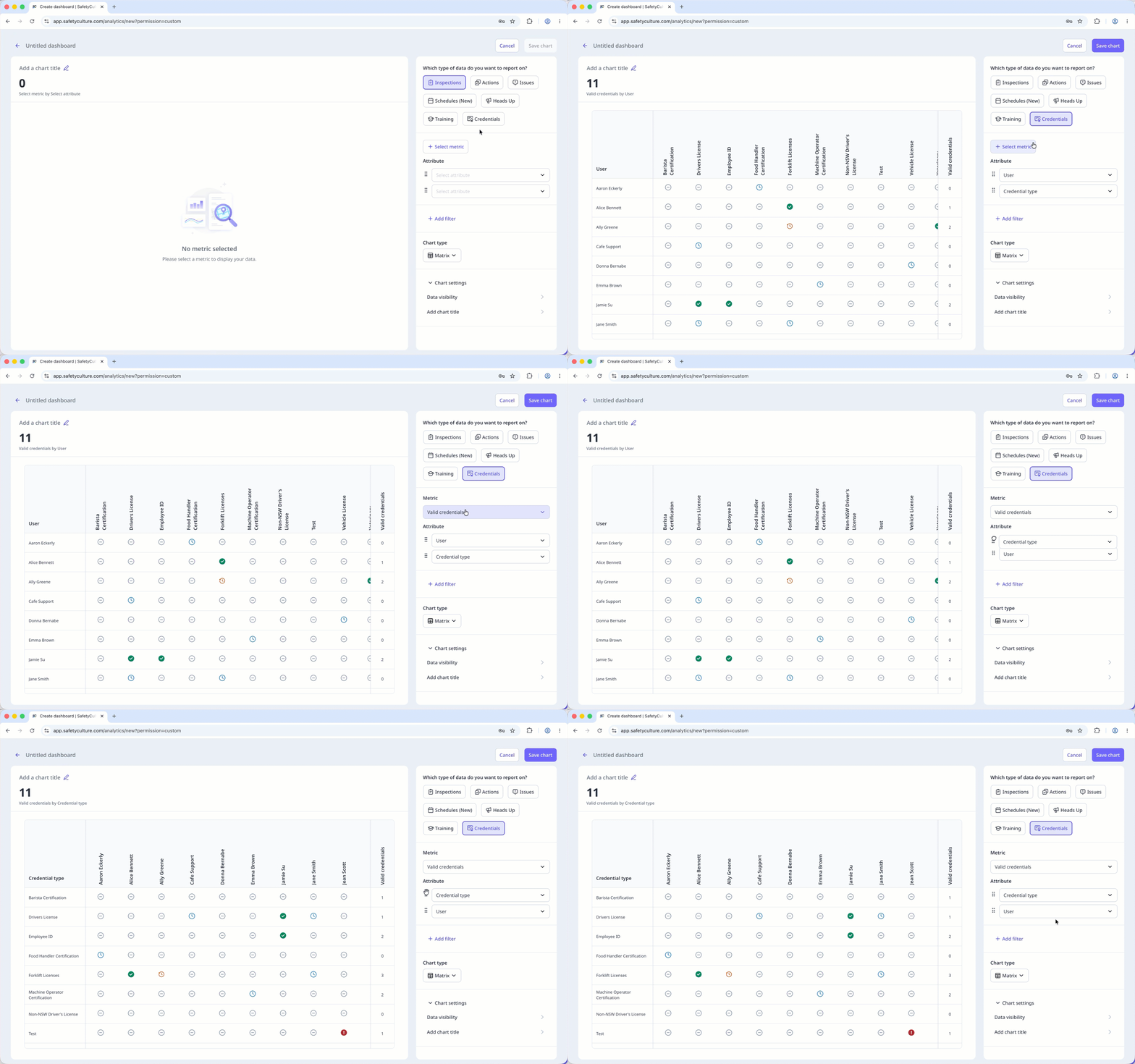
Dans le générateur de graphiques, configurez le type de données et la métrique de la façon suivante :
Type de données : Sélectionnez Habilitations en haut à droite de la page.
Métrique : Cliquez sur Sélectionner la métrique et sélectionnez et Valid credentials dans le menu déroulant.
Attribut : Faites glisser pour réorganiser les attributs. Le premier attribut devient les lignes de la matrice, et le nombre en haut du graphique se met à jour en conséquence.
Configurez votre type de graphique en conséquence.
Cliquez sur Enregistrer le graphique en haut à droite de la page pour enregistrer les modifications apportées au graphique.
Cliquez sur Enregistrer en haut à droite de la page pour enregistrer les modifications dans votre tableau de bord.
Credential matrix statuses
: The credential has been submitted and is valid.
: The credential hasn't been submitted yet.
: The credential has been submitted and will expire in 90 days.
: The credential has been submitted and is past its expiration date.
: The credential has been submitted and is pending approval.
Limitations
Dashboard-level filters, including Date, don't apply to the credential matrix.
Only credentials from active users in the organization appear in the matrix.
You can only export matrix chart data as CSV. Downloads respect the column and row filter selections you've applied to the matrix.
The search bar filters by rows only. You can't search by column.