¿Por qué realizar un seguimiento de los envíos de credenciales en Estadísticas?
Realice un seguimiento de los envíos de credenciales en Estadísticas para obtener una visión en tiempo real del estado de las credenciales de su equipo en cada tipo de credencial. Podrá ver de un vistazo quién tiene credenciales válidas y quién debe actualizarlas. Es fácil pasar por alto las carencias en las credenciales cuando se realiza el seguimiento de varias credenciales en un equipo numeroso. También puede filtrar su lista para mostrar a los usuarios de empresas contratistas específicas y profundizar en cualquier credencial para obtener todos los detalles. Exporte sus datos en formato CSV para compartirlos con los gerentes o tomar medidas respecto a los usuarios con credenciales caducadas o a punto de caducar.
Lo que necesitarás
Seguimiento de los envíos de credenciales
Solo se admite el tipo de gráfico de matriz.
Seleccione Estadísticas en la barra lateral o en Más.
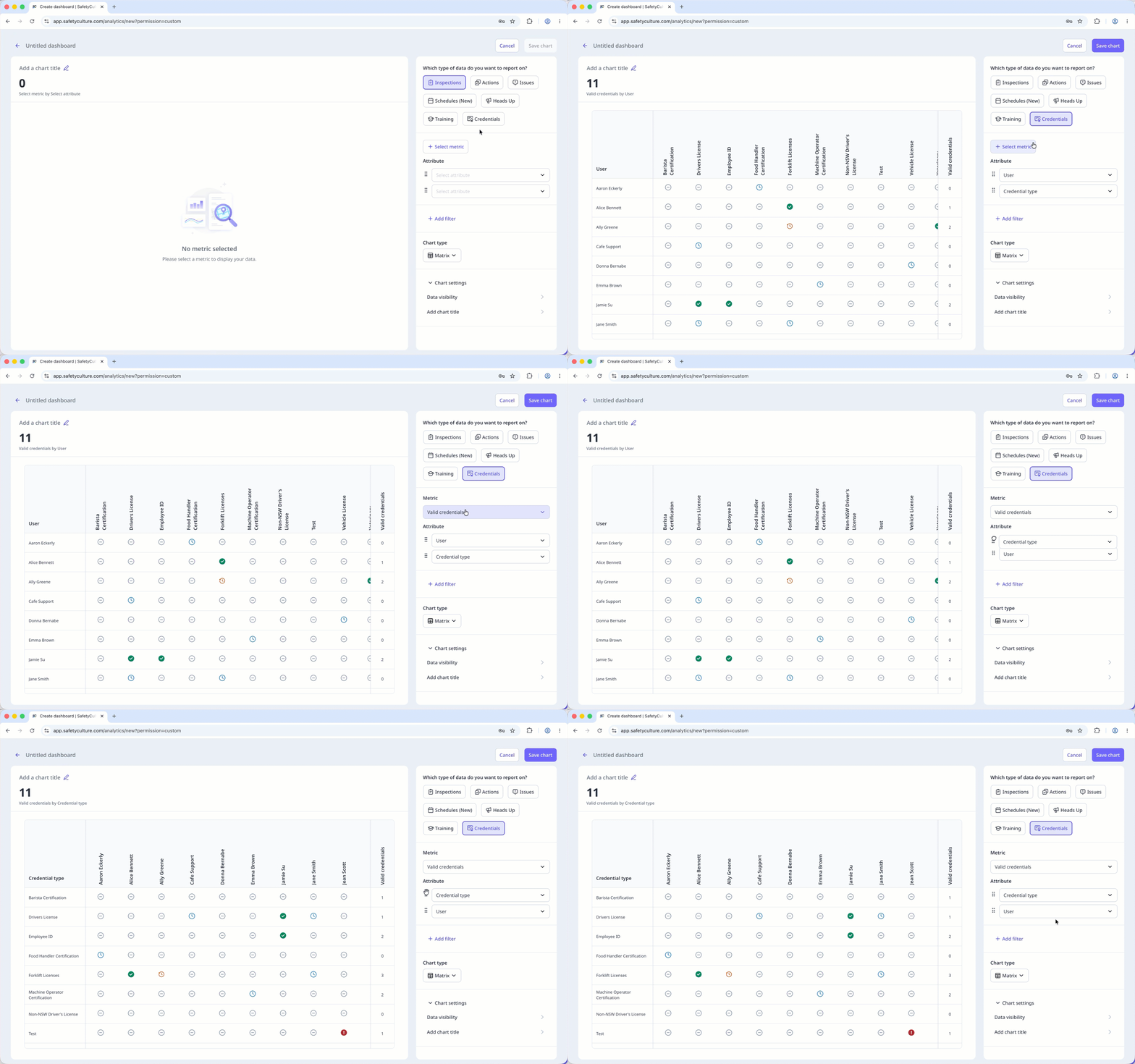
Haga clic en Añadir gráfico en la parte superior derecha de la página y seleccione Añadir gráfico personalizado.
En el generador de gráficos, configure el tipo de datos y la métrica de la siguiente manera:
Tipo de datos: Seleccione Credenciales en la parte superior derecha de la página.
Métrica: Haga clic en Seleccionar métrica y seleccione Valid credentials en el menú desplegable.
Atributo: Arrastre para reordenar los atributos. El primer atributo se convierte en las filas de la matriz y el recuento en la parte superior del gráfico se actualiza para coincidir.
Configure su tipo de gráfico como corresponda.
Haga clic en Guardar gráfico en la parte superior derecha de la página para guardar los cambios en el gráfico.
Haga clic en Guardar en la parte superior derecha de la página para guardar los cambios en su panel.
Credential matrix statuses
: The credential has been submitted and is valid.
: The credential hasn't been submitted yet.
: The credential has been submitted and will expire in 90 days.
: The credential has been submitted and is past its expiration date.
: The credential has been submitted and is pending approval.
Limitations
Dashboard-level filters, including Date, don't apply to the credential matrix.
Only credentials from active users in the organization appear in the matrix.
You can only export matrix chart data as CSV. Downloads respect the column and row filter selections you've applied to the matrix.
The search bar filters by rows only. You can't search by column.