
Why use RFID for asset management?
RFID (Radio Frequency Identification) identifies tagged objects using radio waves without direct contact or line of sight. In SafetyCulture, you can scan RFID tags to automatically fill the unique ID when creating assets or to locate tagged assets in the field. RFID is especially valuable in high-volume environments like warehouses, worksites, or depots, where quick and accurate identification matters most. Scanning RFID tags speeds up registration, reduces manual entry errors, and keeps your asset records accurate and up to date.
Interacting with assets using RFID requires mobile app versions 25.24 or higher and devices running Android 8 and above.
What you'll need
Make sure your Zebra scanner is connected via Bluetooth and your mobile device is online before scanning RFID tags.
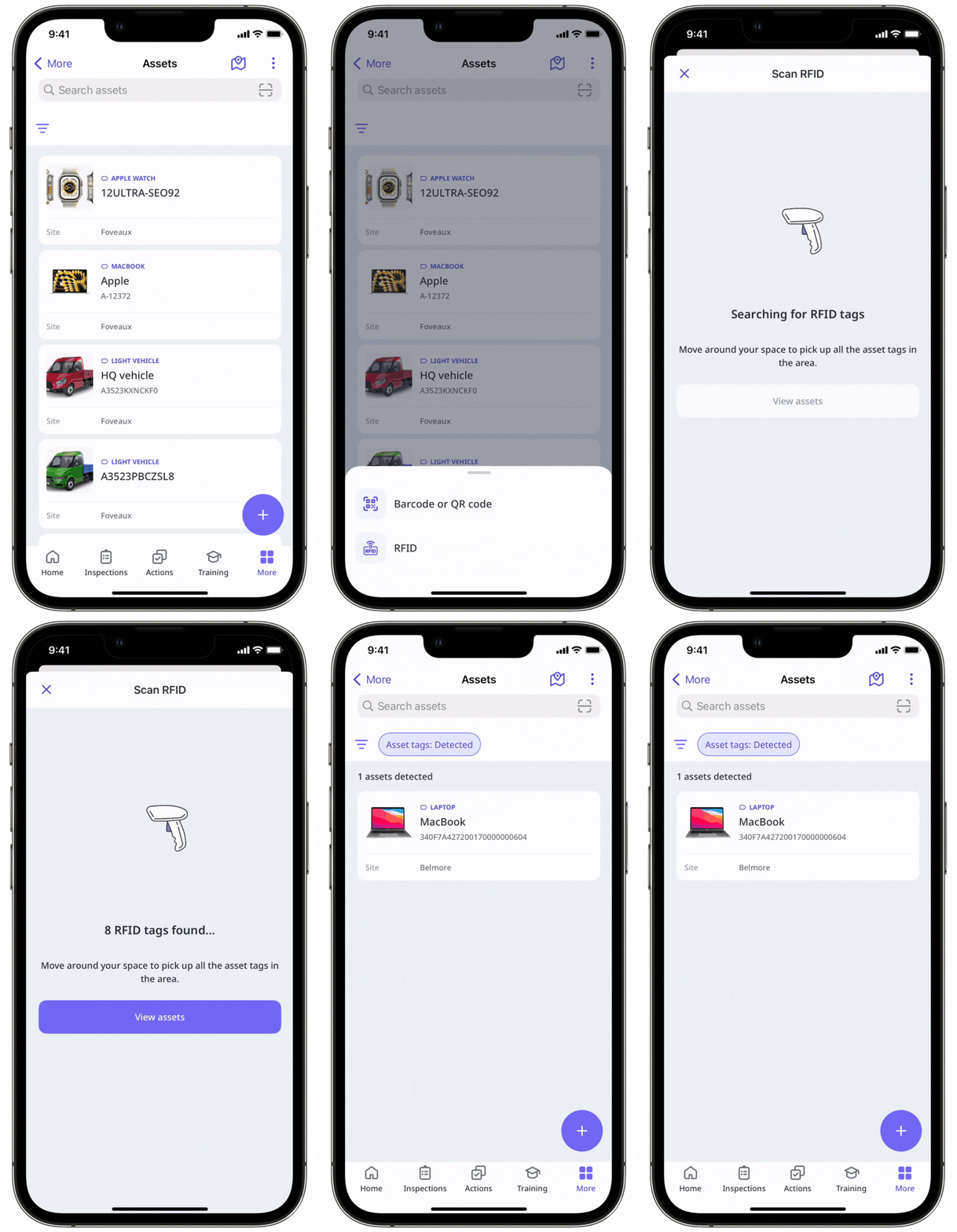
Search for assets using RFID
Open the mobile app.
Tap Assets from the navigation bar or select it in More.
Tap at the top of your screen and select RFID.
Walk through the area with your scanner to detect nearby asset tags.
Tap View assets to see matching results. The list only shows RFID tags that are linked to assets.


