
What are issue QR codes?
Issue QR codes are scannable codes that allow your team to report issues in SafetyCulture, even without an account. When you scan a QR code, you can select a category, add a title and description, attach photos or videos, choose a relevant site, and answer custom questions. You can also provide contact details to receive updates on the reported issue. This ensures your team can fully understand the issue and resolve it efficiently.
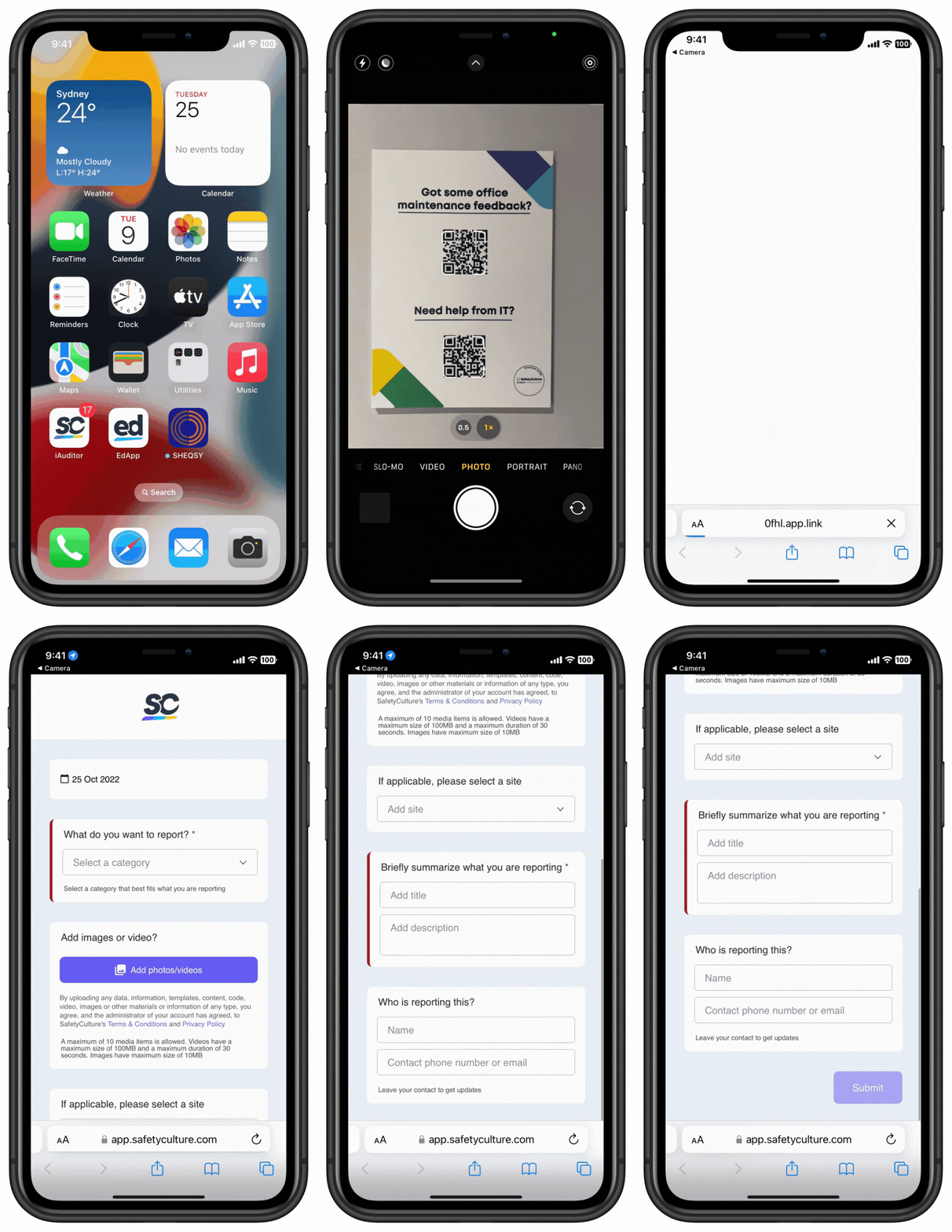
You can place your issue QR codes at convenient locations so your team can scan them to report issues. Consider locations that are easily accessible, such as entrances, vehicles, or even your personal protective equipment (PPE).
What you'll need
You don't need a SafetyCulture account to report issues via issue QR codes.
Report an issue via an issue QR code
Scan the issue QR code.
This should open a page via your device's default web browser.
Select the issue category.
Enter the details to the required fields or custom questions.
At the bottom of your screen, enter your name and email address or phone number. This allows stakeholders to contact you about your report.
Tap Submit.
You can upload up to 10 media attachments, including photos up to 10MB each and videos up to 30 seconds or 100MB.
Depending on the QR code's settings, you might find that the category, site, or asset fields have been pre-filled already.


