How do form requests in companies work?
Form requests help company managers capture structured information directly from key contacts through standardized compliance forms. You can request the specific documents that key contacts need to fill out and complete, such as prequalification questionnaires, site safety checklists, or other compliance forms. As a company manager, you can control which forms are uploaded and shared, ensuring every contractor provides the necessary supporting details. This improves consistency and strengthens compliance across your organization.
You can request company documents and forms while adding a new company.
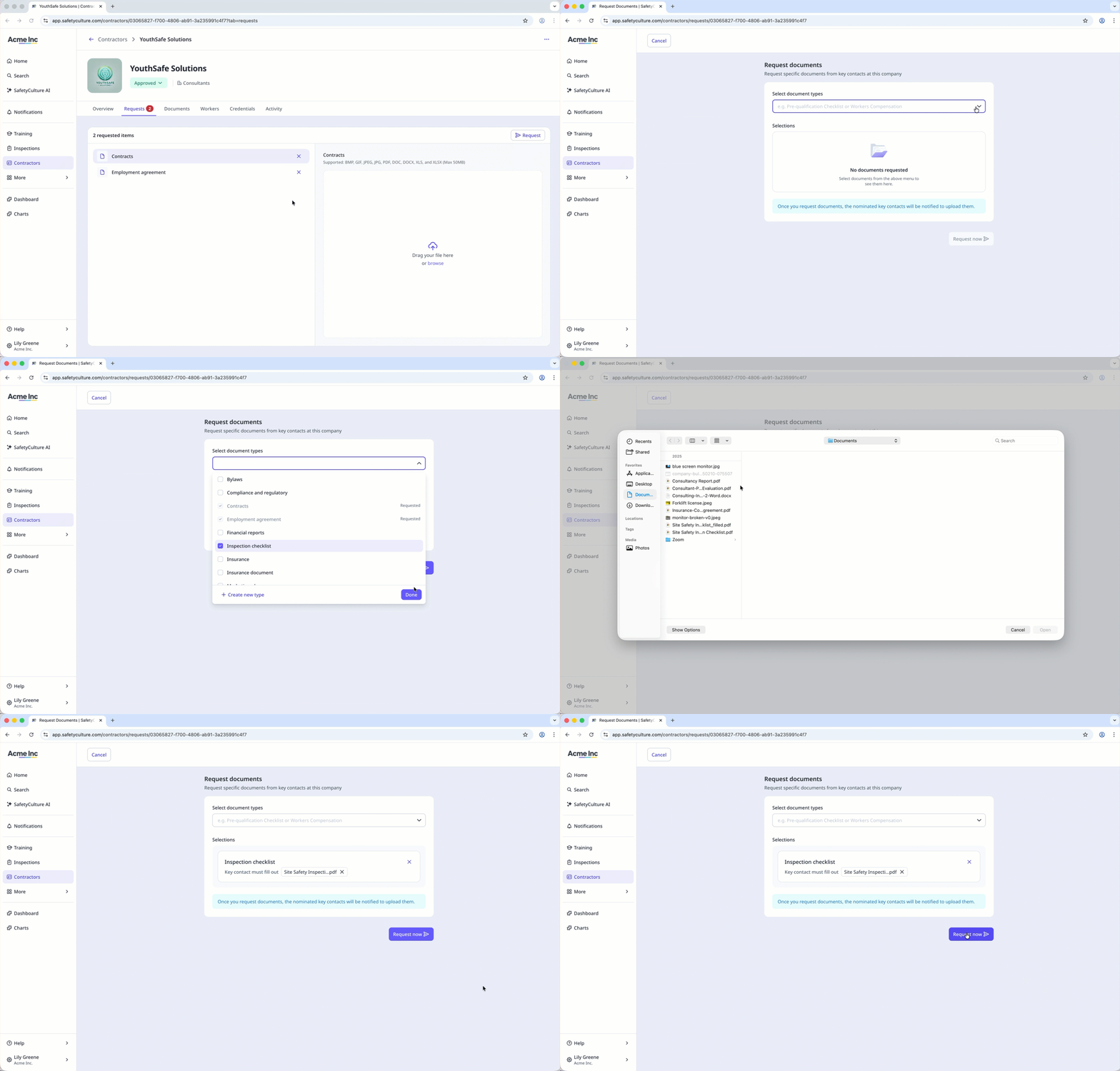
Request a company form
Select
 Contractors in the sidebar or select it in More .
Select a company.
Click Requests tab in the company profile.
Click Request on the upper-right of the page.
Select or create a document type and click Done .
Clickand select the form you want to upload.
If there is no key contact assigned:
Invite a new user: Enter the email address, first name, and last name. The new user will join your organization on a Guest seat and will only be able to manage documents and workers for their assigned company.
You can also customize the email they’ll receive in the “Message for the key contact” section.Select an existing user: Select a user from the dropdown and click Done .
Click Request now .
You can request a new version of documents or forms from the company profile or the Contractors dashboard to remind key contacts to update specific documents.