How do document requests in companies work?
Document requests help company managers collect the right documents during contractor prequalification. This provides a consistent, structured way to request documents from key contacts at each contractor company they manage. As a company manager, you can send document requests as soon as you add a contractor company to your organization or to existing ones already in the system. This simplifies the prequalification process and helps ensure each contractor company meets your compliance requirements before starting work.

You can request company documents and forms while adding a new company.
Request a company document
Select
 Contractors in the sidebar or select it in More .
Select a company.
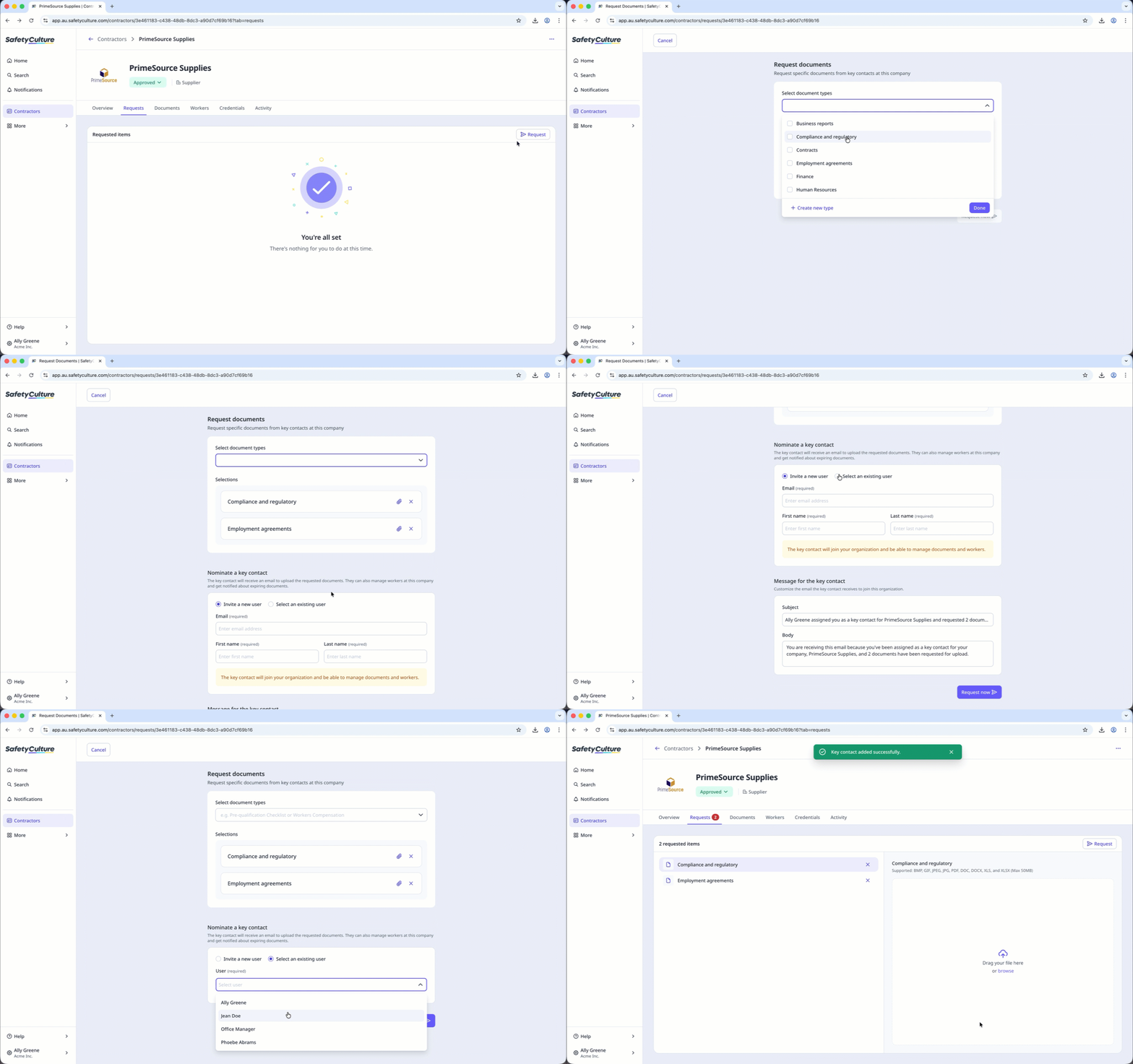
Click Requests tab in the company profile.
Click Request on the upper-right of the page.
Select or create a document type and click Done .
If there is no key contact assigned:
Invite a new user: Enter the email address, first name, and last name. The new user will join your organization on a Guest seat and will only be able to manage documents and workers for their assigned company.
You can also customize the email they’ll receive in the “Message for the key contact” section.Select an existing user: Select a user from the dropdown and click Done .
Click Request now .
You can request a new version of documents or forms from the company profile or the Contractors dashboard to remind key contacts to update specific documents.