
Contractors

Last updated: July 7, 2026

View user credentials in companies

Learn how to view the credentials of users in your companies to monitor your team's compliance and qualifications via the web app.

Why view user credentials in a company?

Viewing a company profile lets you see and manage worker credentials, add renewals, and track credential history. Keeping compliance verification in one place ensures workers are qualified for their assigned tasks.
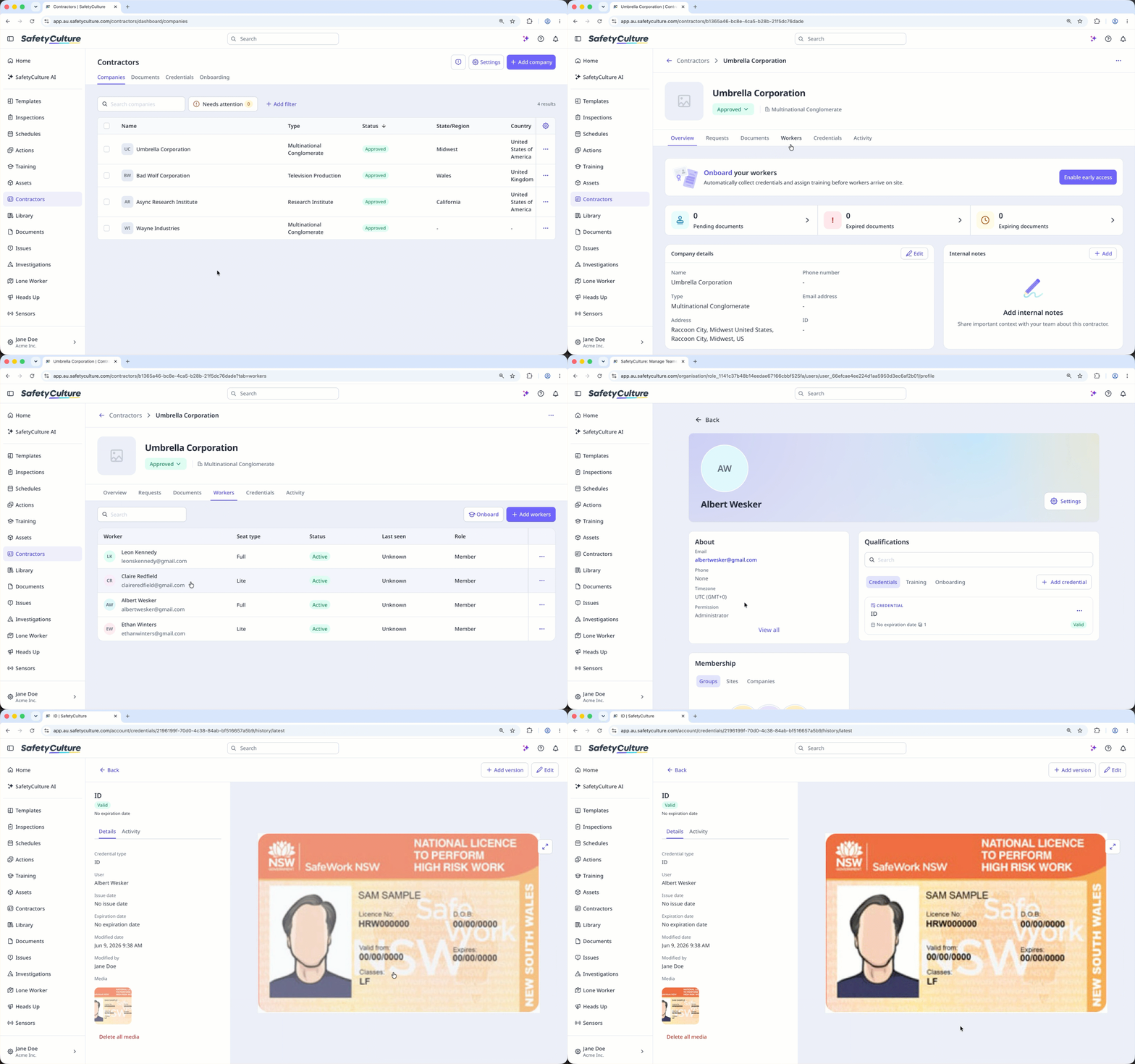
Click 'Workers' tab on the company profile and select a worker to view their credentials.

View a user's credentials

  1. Log in to the web app (opens in new tab).

  2. Select Contractors in the sidebar or select it in More.

  3. Select the company.

  4. Select Workers tab at the center of the page.

  5. Select the user.

  6. In the "Qualifications" section, select the credential.

Click 'Workers' tab on the company profile and select a worker to view their credentials.

Frequently asked questions

Was this page helpful?

SafetyCulture
App Store
Google Play
