What does it mean to import course completions?
Importing course completions transfers your team's existing training history into SafetyCulture, so you don't have to manage records across multiple systems. Once imported, the selected users are marked as having completed the course on the specified date, and completions are reflected in the performance dashboard. You can import completions, whether the training happened in another system, in person, or if you need to mark training as complete for courses already in SafetyCulture.
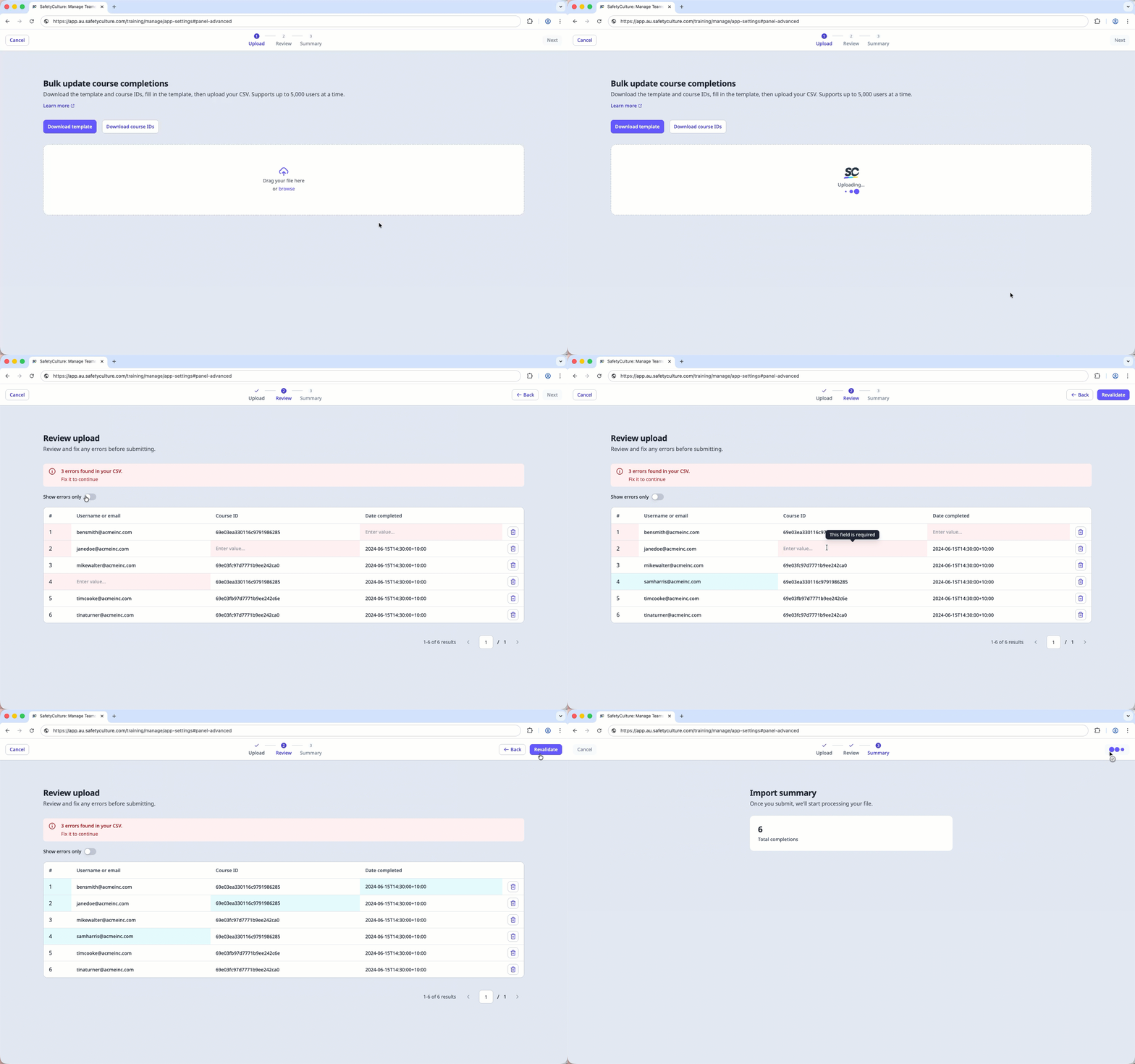
You can only add 5,000 rows per CSV file.
Import course completions
Imported course completion data can take up to 2 hours to sync to the performance dashboard. We're working to reduce this sync time in the future.
Limitations
Imported completions are marked at 100% in the performance dashboard. The course is marked as complete, but individual lesson responses and scores are not recorded.
If a course contains practical assessments, the completion will be recorded, but a PDF of the assessment will not be generated.
If a user has existing progress on the course, their completion won't be imported, and their current progress will remain unchanged.
Completion dates must be a past or current date. Future dates are not supported.
CSV column headers
Column header | Description |
|---|---|
course_id | The unique identifier of the course in SafetyCulture. You can find this in the course URL or download it using Download course IDs. |
user_email | The email address of the user whose course completion you're importing. The user must exist in your organization. |
completion_date | The date and time the course was completed. Use ISO 8601 format, for example 2024-06-15T14:30:00+10:00 for a specific time and time zone, or 2024-06-15 for a date only. |
CSV troubleshooting guide
If there's an error in the CSV you've uploaded, we'll highlight it when you're reviewing your upload. You can refer to the following potential errors for resolutions.
Errors | Resolution |
|---|---|
Missing user email | Enter the email address of the user. The user must exist in your organization. |
Missing course ID | Enter the course ID. You can find this in the course URL or download it using Download course IDs. |
Missing completion date | Enter the completion date. Use ISO 8601 format, for example, 2024-06-15T14:30:00+10:00 for a specific time and time zone, or 2024-06-15 for a date only. |
Invalid course ID | Check that the course ID matches an existing course in SafetyCulture. You can download the list of valid course IDs using Download course IDs. |
Invalid date format | The completion date must follow ISO 8601 format, for example 2024-06-15T14:30:00+10:00. |
Completion date is in the future | The completion date can't be a future date. Enter a date that has already passed. |
Course not found | Check that the course ID is correct and the course exists in SafetyCulture. |
Course not published | The course must be published before you can import completions. Publish the course and try again. |
Course title doesn't match | The course title in your CSV doesn't match the actual course title in SafetyCulture. Update it to match exactly. |
User not found | Check that the email address is correct and that the user is active in your organization. |
User not found in Training | The user exists in your organization but hasn't been added to Training. Add the user to Training and try again. |
Processing error | An unexpected error occurred. Try importing again or contact support if the issue persists. |