
Gestionar finalizaciones de cursos
Aprenda cómo funciona la importación de finalizaciones de cursos y cómo importarlas a través de la aplicación web para mantener un registro completo y preciso del historial de formación de su equipo.¿Qué significa importar finalizaciones de cursos?
Solo puede añadir 5000 filas por archivo CSV.
Importar finalizaciones de cursos
Seleccione
 Formación en la barra lateral o selecciónelo en
  Más.
Más.Si está en la página de "Aprender", haga clic en Contenido en la parte superior de la página y seleccione Cursos.
Haga clic en
 Ajustes en la esquina superior derecha de la página.
Haga clic en Avanzado en la parte superior izquierda de la página.
Haga clic en
 Importar finalizaciones en la parte superior derecha de la página.
Haga clic en Descargar plantilla para descargar la plantilla CSV que utilizará para introducir sus datos de finalización.
Haga clic en Descargar identificaciones de cursos para descargar la lista de identificaciones de cursos que necesitará para asociar cada finalización al curso correcto.
In the CSV file, fill in the completion data for each row. Use the course IDs file you downloaded to match each completion to the correct course.
Your CSV file must meet these requirements:
Link each completion to an existing course in SafetyCulture by copying the course ID from the course IDs file and pasting it into the corresponding column.
Use ISO 8601 format for completion dates, for example
2024-06-15T14:30:00+10:00for a specific time and time zone, or2024-06-15for a date only.Keep your data in a single tab. If your file has multiple tabs, split them into separate CSV files or consolidate your data into one tab.
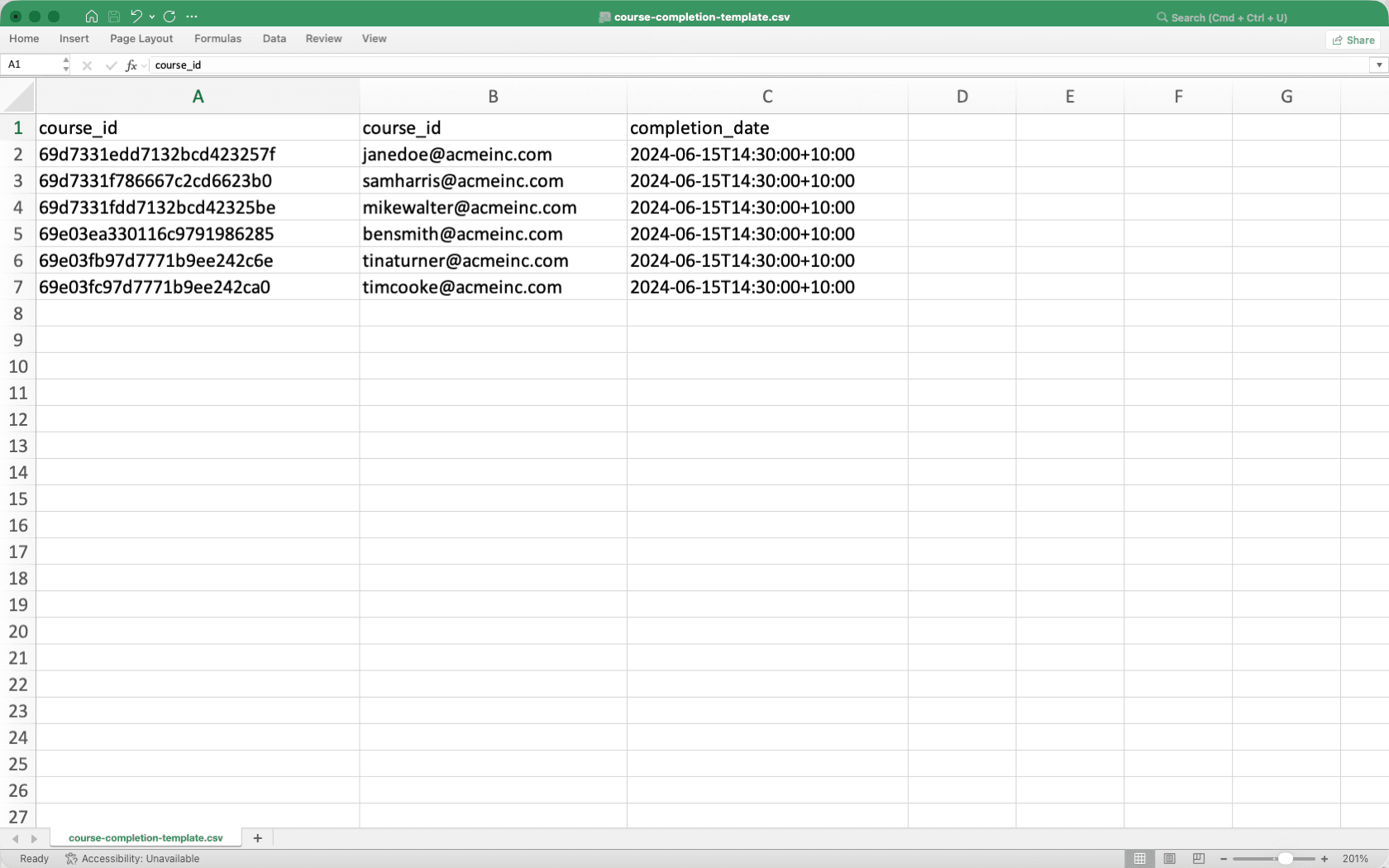
Once you're ready, your CSV should look like the following example:
Vuelva a
Formación en la aplicación web.Si está en la página de "Aprender", haga clic en Contenido en la parte superior de la página y seleccione Cursos.
Haga clic en
Ajustes en la esquina superior derecha de la página.Haga clic en Avanzado en la parte superior izquierda de la página.
Haga clic en
Importar finalizaciones en la parte superior derecha de la página.Arrastre sus archivos o haga clic en examinar para seleccionar su archivo CSV.
Los datos de finalización de cursos importados pueden tardar hasta 2 horas en sincronizarse con el panel de rendimiento. Estamos trabajando para reducir este tiempo de sincronización en el futuro.
Limitaciones
Las finalizaciones importadas se marcan al 100 % en el panel de rendimiento. El curso se marca como completado, pero las respuestas y puntuaciones de las lecciones individuales no se registran.
Si un curso contiene evaluaciones prácticas, la finalización quedará registrada, pero no se generará un PDF de la evaluación.
Si un usuario tiene progreso existente en el curso, no se importará su finalización y su progreso actual permanecerá sin cambios.
Las fechas de finalización deben ser una fecha pasada o actual. No se admiten fechas futuras.
CSV column headers
Column header | Description |
|---|---|
course_id | The unique identifier of the course in SafetyCulture. You can find this in the course URL or download it using Descargar identificaciones de cursos. |
user_email | The email address of the user whose course completion you're importing. The user must exist in your organization. |
completion_date | The date and time the course was completed. Use ISO 8601 format, for example |
CSV troubleshooting guide
If there's an error in the CSV you've uploaded, we'll highlight it when you're reviewing your upload. You can refer to the following potential errors for resolutions.
Errors | Resolution |
|---|---|
Missing user email | Enter the email address of the user. The user must exist in your organization. |
Missing course ID | Enter the course ID. You can find this in the course URL or download it using Download course IDs. |
Missing completion date | Enter the completion date. Use ISO 8601 format, for example, |
Invalid course ID | Check that the course ID matches an existing course in SafetyCulture. You can download the list of valid course IDs using Descargar identificaciones de cursos. |
Invalid date format | The completion date must follow ISO 8601 format, for example |
Completion date is in the future | The completion date can't be a future date. Enter a date that has already passed. |
Course not found | Check that the course ID is correct and the course exists in SafetyCulture. |
Course not published | The course must be published before you can import completions. Publish the course and try again. |
Course title doesn't match | The course title in your CSV doesn't match the actual course title in SafetyCulture. Update it to match exactly. |
User not found | Check that the email address is correct and that the user is active in your organization. |
User not found in Training | The user exists in your organization but hasn't been added to Training. Add the user to Training and try again. |
Processing error | An unexpected error occurred. Try importing again or contact support if the issue persists. |
Preguntas frecuentes
No. Solo puede importar una finalización por curso para cada usuario.
If you add a lesson to a course after importing completions, the completion for affected users will drop below 100%. For example, if a course had 4 lessons and you add a 5th, users with imported completions will show 80% complete instead of 100% complete.
To avoid this, make sure all lessons are added to the course before importing completions.
Yes. Completions can be imported for deactivated users and those without Training permissions. However, these completions won't appear in the performance dashboard.
Las fechas de finalización importadas pueden aparecer antes que la fecha de publicación del curso. Estas fechas reflejan registros históricos de otro sistema o de un sistema de gestión del aprendizaje y son de esperar en las finalizaciones importadas.
Sí. Las finalizaciones se pueden importar para usuarios que no han sido asignados al curso. El curso se reflejará como completado en el panel de rendimiento para esos usuarios.
¿Esta página le fue de ayuda?
Gracias por hacérnoslo saber.