How does AI issue creation work?
With AI issue creation, you can capture and submit issues faster without manually filling in every field. Record a voice note to capture details and attach photos for further context, and AI generates suggested values for issue fields such as the title, description, category, date occurred, and custom questions based on what you’ve shared.
You can review, edit, or clear any field before submitting, so the final report always reflects what you actually observed on site.
Adding descriptions to issue categories helps the AI categorize reports more accurately. The more specific the description, the better the match.
Users must have SafetyCulture version 26.26 or above to report issues using AI on the mobile app.
Report an issue using AI
When reporting an issue, the more context you add, the better the AI can fill in the report. Consider describing the issue in detail with information including:
Where and when it happened
What caused it
Who was involved
What the impact was
What action is needed
Whether this has happened before
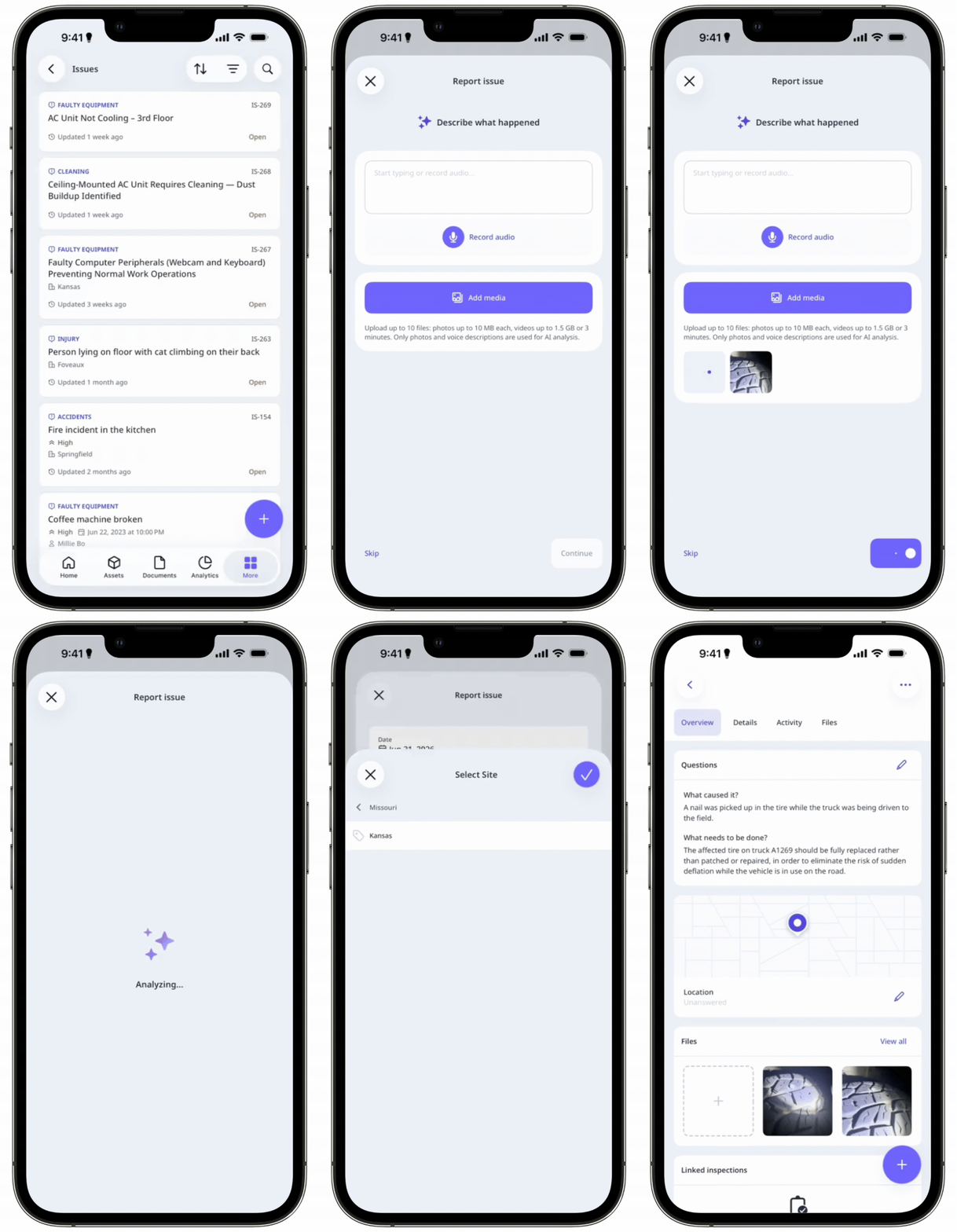
Open the mobile app.
Tap Issues in the navigation bar or select it from More.
Tap at the lower-right corner of your screen.
In the pop-up window, add context to the issue.
Tap Record audio to record a voice note, or type your description in the text field.
Tap Add media to upload supporting photos or videos.
Tap Continue at the lower-right of your screen.
The AI will generate suggested details for the issue. Review and complete any remaining fields.
Tap Submit.
On iOS, you can set up your device so that you can report an issue using AI directly from the Action button, Siri, or Spotlight.
Report an issue using AI via QR code
You don't need a SafetyCulture account to report issues via issue QR codes.
Scan the issue QR code. This should open a page via your device's default web browser.
A dd context to the issue.
Tap Record audio to record a voice note, or type your description in the text field.
Tap Add media to upload supporting photos or videos.
Tap Continue.
The AI will generate suggested details for the issue. At the bottom of your screen, enter your name and email address or phone number. Adding your contact details allows stakeholders to contact you about your report.
Review and complete any remaining fields.
Tap Submit.
You can upload images up to 10 MB and videos up to 1.5 GB or three minutes long.
Supported languages
Arabic
Bengali
Chinese (Simplified)
English
French
German
Hindi
Indonesian
Italian
Japanese
Korean
Portuguese (Brazil)
Spanish
Swahili
Limitations
AI generates details from photos, voice recordings, and text descriptions. You can still upload videos as evidence, but the AI won't analyze them.
If a user enters details via voice input in a different language (e.g. Chinese, Spanish), issue details will be generated in their organization language.
AI issue creation isn’t currently supported in the web app. However, users can use a browser to report issues using the QR code link.