
What does it mean to filter inspections by responses?
Filtering inspections by responses makes it easier to find the information you need without going through every inspection manually. By narrowing results to specific answers, you can quickly identify trends, spot recurring issues, and track key outcomes. This helps you focus on the most relevant data, whether you're analyzing flagged responses, monitoring compliance, or looking for patterns in your team's performance. With more precise filtering, reporting becomes faster, decision-making is more informed, and taking action on critical insights is easier than ever.
What you'll need
Filter inspections by a response
Select Analytics in the sidebar or select it in More.
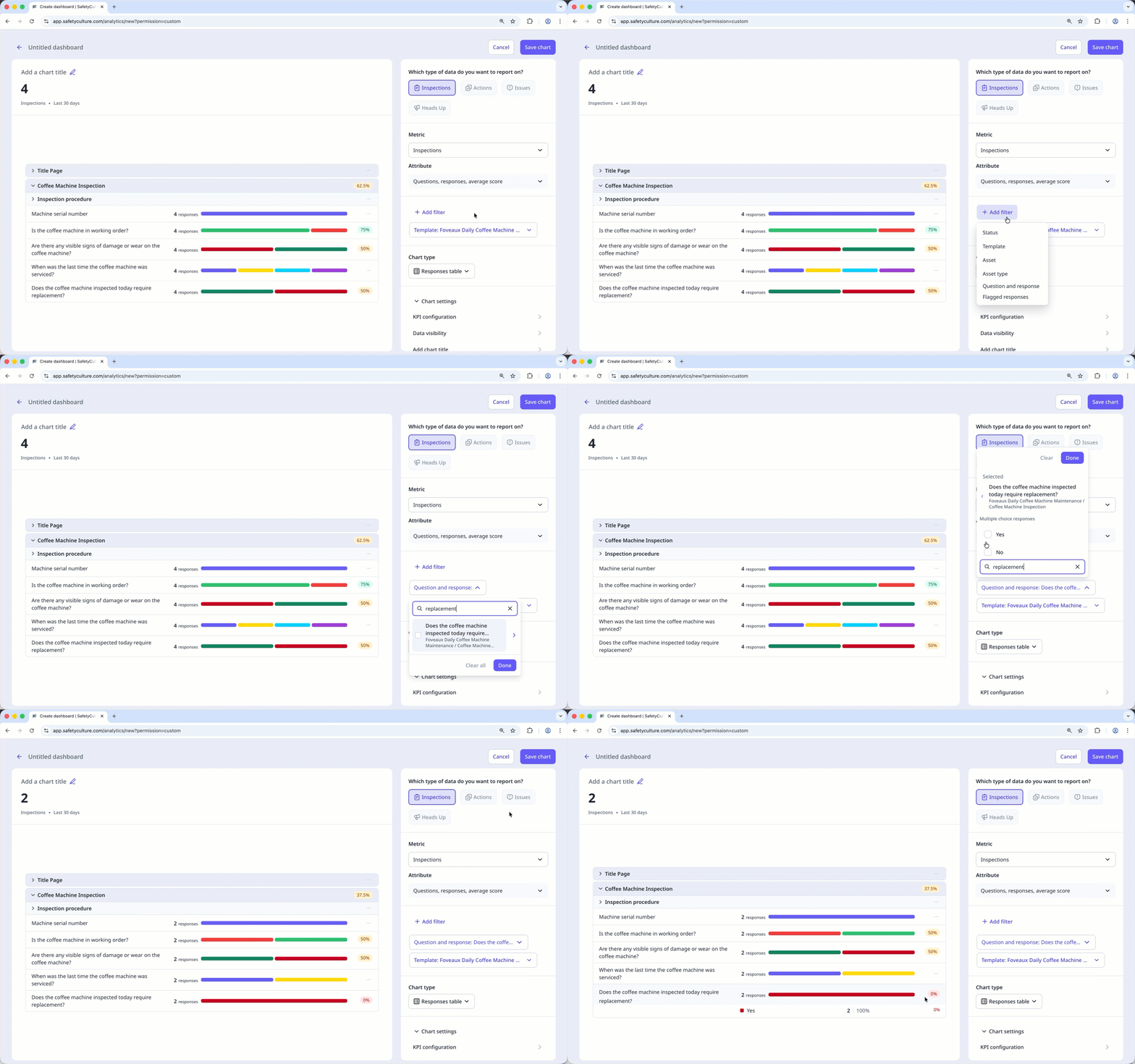
Configure your chart accordingly.
Click Add filter and select Question and response.
Search for a question, then select or enter the response you want to filter with.
Click Done.
Click Save chart on the upper-right of the page to save the changes to the chart.
Click Save on the upper-right of the page to save the changes to your dashboard.
Limitations
You can only enter up to 250 characters or 25 words when searching for a question and response.
The following special characters are supported: $, %, ., _, -, and #.
For character-based languages, only Chinese, Japanese, and Korean are supported.


