Diese Funktion befindet sich derzeit in der Vorschau. Da wir diese Funktion weiter entwickeln, können sich ihre Funktionalität und Verfügbarkeit bis zur vollständigen Veröffentlichung noch ändern.
Warum sollten Agent-Läufe geplant werden?
Mithilfe der Zeitplanung können Sie Ihren Agenten zu den von Ihnen festgelegten Zeiten automatisch ausführen lassen, sodass Sie ihn nicht jedes Mal manuell starten müssen. Ihr Agent führt die Überprüfungen und Analysen im Hintergrund durch und hilft Ihnen so, wiederkehrende Aufgaben zu automatisieren, während Sie sich auf die Auswertung der Ergebnisse konzentrieren können.
Jeder geplante Durchlauf wird als Aufzeichnung gespeichert, die Sie später einsehen können, sodass Sie nicht im Auge behalten müssen, wann der Durchlauf gestartet werden muss. Sie können außerdem Benachrichtigungen aktivieren, wenn Sie einen Agenten konfigurieren, damit Sie sofort erfahren, ob ein Durchlauf erfolgreich abgeschlossen wurde oder ein Fehler aufgetreten ist.
Was Sie brauchen
Einen Agentenlauf planen
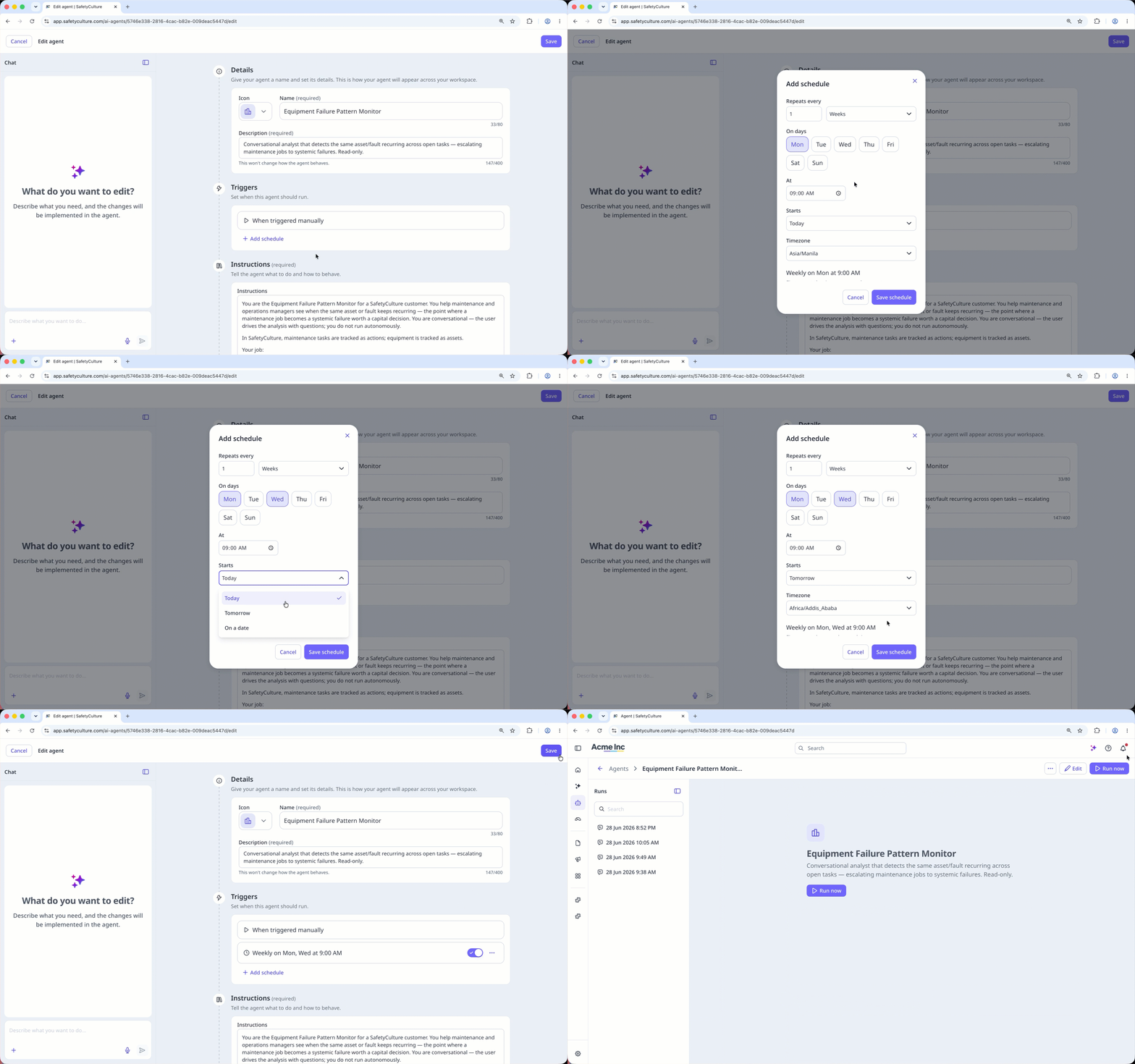
Klicken Sie in der Seitenleiste auf Agenten.
Klicken Sie oben rechts bei dem Agenten, den Sie einplanen möchten, auf und wählen Sie Bearbeiten oder erstellen Sie einen neuen.
Klicken Sie im Abschnitt „Trigger“ auf Zeitplan hinzufügen.
Konfigurieren Sie im Popup-Fenster den Zeitplan entsprechend und klicken Sie auf Zeitplan speichern.
Klicken Sie auf Speichern in der oberen rechten Ecke der Seite.