
This feature is part of an add-on package for individual assets. To explore if it’s the right fit for your team, reach out to your customer success manager or get in touch with a product expert about sensor and telematics solutions.
What are asset events?
Asset events are automated updates from telematics devices that reflect changes in an asset’s movement or operating status. These events help you understand how an asset is being used over time without requiring manual input from your team.
Specifically, you can view the following events:
Engine on/off: Indicates when an asset's engine is started or stopped.
Idle started/ended: Indicates when an asset's engine is started or stopped, but it remains stationary.
Location updates: Captures periodic GPS-reported locations showing where the asset was at a specific time.
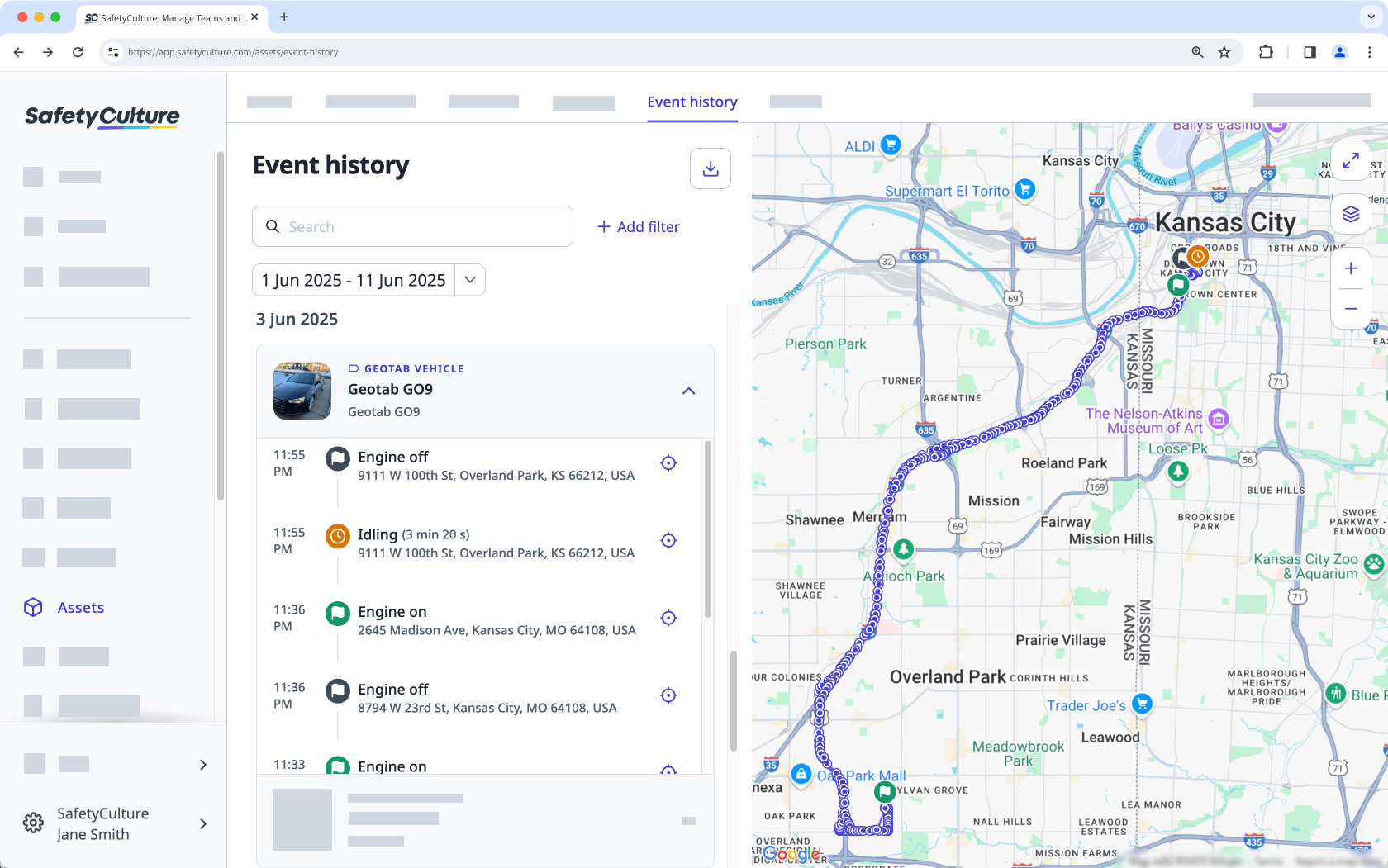
These events are especially useful for verifying usage, identifying safety risks, and gaining operational visibility across vehicles and other tracked equipment.
What you'll need
View asset event history
Select Assets in the sidebar or select it in More.
Click Event history at the top of the page.
Search for the asset's unique ID, type, or display name.
Click Add filter to filter results by site, asset type, or asset.
Click the date picker on the left-hand side to set your preferred date range.
Click any event to see the asset's location and movement on the map.


