Que sont les traductions de cours ?
Les traductions de cours sont des versions linguistiques d'un cours qui coexistent avec l'original. Vous pouvez transférer du contenu de formation multilingue vers SafetyCulture sans avoir à recréer les cours pour chaque langue. Les traductions sont gérées dans les paramètres d'un cours, où vous pouvez les ajouter manuellement ou avec l'IA. Cela vous permet d'accompagner les équipes de différentes régions dans leur langue préférée sans dupliquer le contenu du cours.
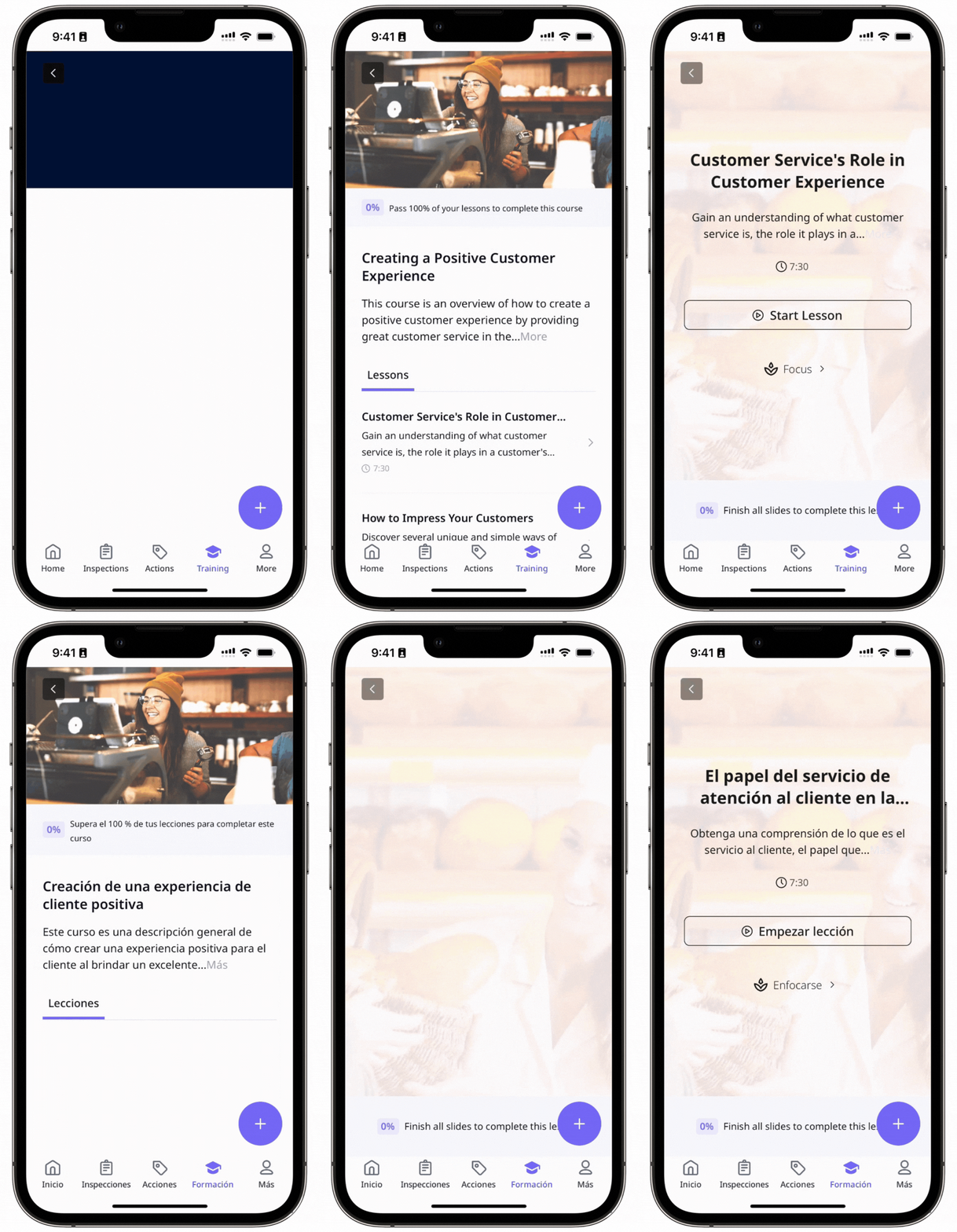
L'exemple suivant montre un cours disponible en anglais et en espagnol utilisant le même contenu :
What are the differences between the legacy and new course translation experience?
Aspect | Legacy experience | New experience |
|---|---|---|
Course structure | Each translated language was created as a complete duplicate course linked to the original. | All translated texts are saved within the same course. |
Settings and theme consistency | Learner assignment and access rules were shared from the original, but structure, settings, and theme were not reliably kept in sync. | Each translated version of your course will keep the same structure, settings, theme, and user management of the original. |
Slide and content sync | Changes to the original do not flow to translations automatically, so translated versions must be updated separately. | If you add, reorder, or delete a slide in the original course, it will instantly update across all translations. These edits can only be made to the original course. |
Editing experience | Edits are done manually to the separated courses, so to view the original course, you had to switch back to it. | While editing a translation, you can view the original text directly below the input fields. |
Language switching | Due to separate translated courses, switching languages was disruptive for learners. | There's a translation switcher to toggle between languages or add a new one. Learners can choose their preferred language before starting, and progress is retained if they switch languages mid-course. |
Analytics and completion | Completion results can become fragmented when learners complete parts of a course in different languages or on different devices. | Multilingual analytics is supported, and switching-related completion issues are avoided. |
Version alignment | Because each language behaves like a separate course, versions can drift over time through mismatched slides, lessons, settings, publish state, or media. | Publishing is blocked when translations are incomplete, helping keep language versions aligned. |
Publishing the course will publish all languages at once.