Esta función se encuentra actualmente en Vista previa. A medida que continuamos desarrollando esta función, su funcionalidad y disponibilidad pueden cambiar antes de su lanzamiento completo.
¿Por qué programar ejecuciones de agentes?
La programación permite que su agente se ejecute automáticamente a las horas que usted elija, para que no tenga que ejecutarlo manualmente cada vez. Su agente realiza las comprobaciones y los análisis en segundo plano, lo que le ayuda a automatizar las tareas recurrentes mientras se centra en revisar los resultados.
Cada ejecución programada crea un registro que puede revisar más tarde, por lo que no tiene que estar pendiente de cuándo iniciarla. También puede activar las notificaciones al configurar un agente, para saber al instante si una ejecución se completa con éxito o si se produce un error.
Lo que necesitarás
Programar una ejecución de agentes
Haga clic en Agentes en la barra lateral.
Haga clic en en la esquina superior derecha del agente que quiera programar y seleccione Editar, o cree uno nuevo.
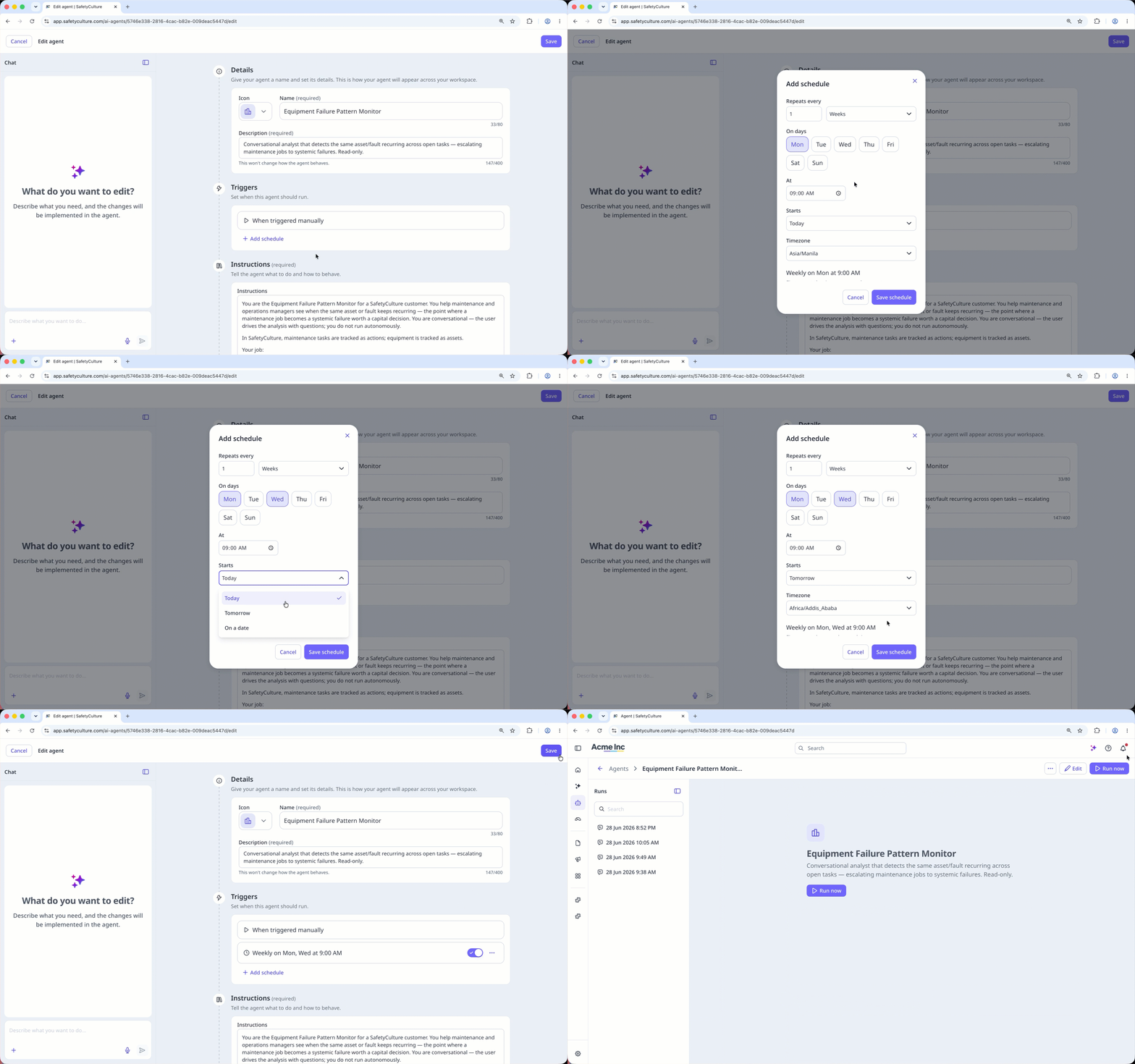
En la sección «Desencadenantes», haga clic en Añadir programa.
En la ventana emergente, configure la programación como corresponda y haga clic en Guardar programa.
Haga clic en Guardar en la esquina superior derecha de la página.