This feature is currently in Preview. As we continue developing this feature, its functionality and availability may change before its full release.
What you'll need
What is the AI Assistant in SafetyCulture?
The AI Assistant in SafetyCulture is a conversational interface that brings together the tools and information users need in one place. It keeps a summary of all a user's past conversations and draws on it in new ones, so context carries over automatically. It helps users work more efficiently across safety, quality, compliance, training, and day-to-day operations. Instead of navigating between features, users can find answers, surface the right context, and take action directly in the platform.
This co-pilot experience saves time on repetitive tasks and makes it easier to stay focused on the work that drives outcomes. With the AI Assistant, you can work smarter, get support when you need it, and spend more time on the work that matters most.
The AI Assistant is turned on by default for all users in your organization. To manage access, review your organization's permission sets.
Turn AI Assistant on or off
Click your organization name on the lower-left corner of the page and select Organization settings.
Select Features at the top of the page.
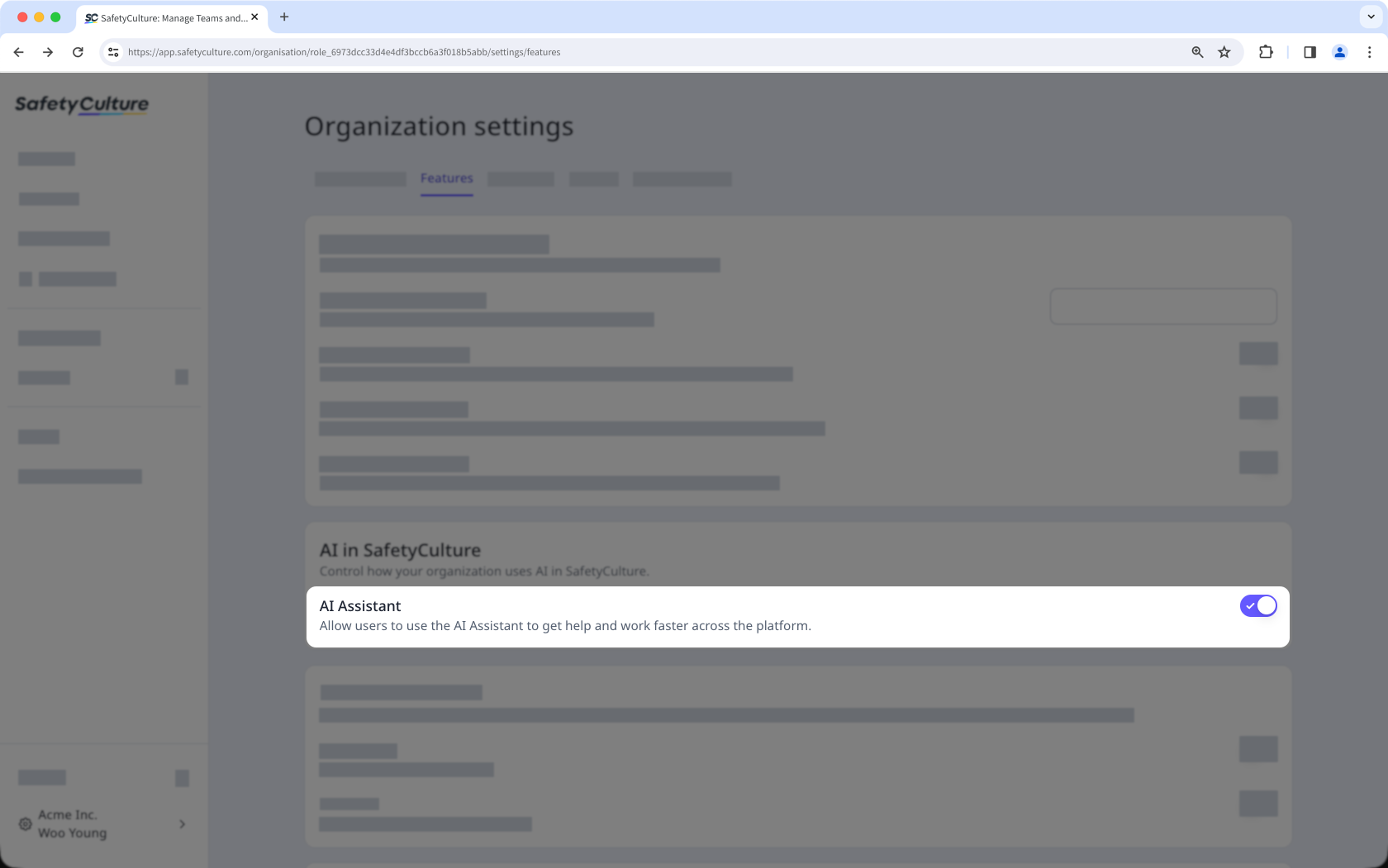
In the "AI in SafetyCulture" section, turn "AI Assistant" on or off.
Add custom contexts to tailor the AI Assistant’s responses to your organization’s workflows and terminology.