
Why should I change my SafetyCulture app theme?
Changing your SafetyCulture app theme lets you switch between light theme, dark theme, or your system's theme on both the web and mobile app. Use light theme in brightly lit environments to keep the screen easy to read. Switch to dark theme in low-light conditions to reduce eye strain and extend battery life when you're working remotely. Choose system theme to let the app adjust automatically as your device's display settings change throughout the day.
The support for dark mode represents our ongoing commitment to make SafetyCulture as comfortable to use by as many people as possible.
Are there any other ways we can improve your SafetyCulture viewing experience? If so, please let us know by submitting your feedback.
What you'll need
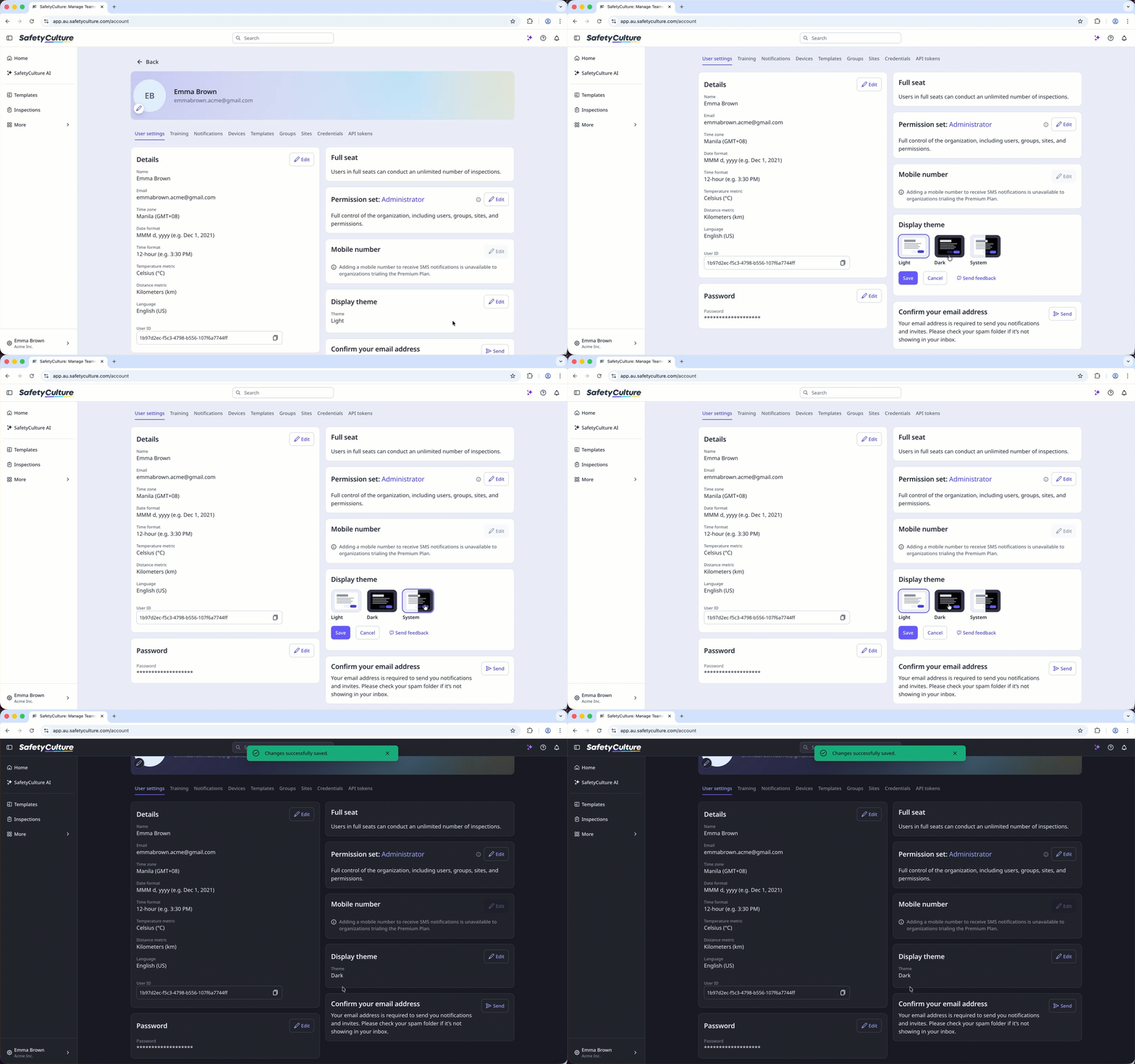
Change the SafetyCulture app theme
Click your username on the lower-left corner of the page and select My profile.
Click Settings on the upper-right of the page.
Click Edit in the "Display theme" section.
Select your theme preference: Light, Dark, or System to follow your system settings.
Click Save.
If the theme settings option isn't available to you, please make sure your SafetyCulture mobile app is on the latest version via the Google Play Store for Android devices or the App Store for iOS devices.


